
A sitemap helps Google understand your website structure and find all important pages more efficiently. Submitting it through Google Search Console is a quick process that improves indexing and supports better SEO performance. It is a simple step that helps ensure your content is discovered and updated properly in search results.
A sitemap is a file that lists all the important pages on a website. It helps search engines like Google understand the structure of your site and find content more efficiently. Without it, some pages may take longer to be discovered or might not be indexed at all.
For search engine optimisation, a sitemap plays a practical role. It acts like a roadmap that guides search engines through your website, ensuring that new and updated content is picked up quickly. This becomes especially useful for larger websites or sites that are regularly updated with new pages, blog posts, or products.
Submitting a sitemap is a simple but important step that supports better visibility in search results and improves overall site performance in search engines.
What Is Google Search Console?
Google Search Console is a free tool provided by Google that helps website owners monitor how their site performs in search results. It gives insights into indexing status, search traffic, and technical issues that could affect visibility.
One of its most useful features is the ability to submit a sitemap directly to Google. This ensures that Google is aware of all the pages on your site and can crawl them more efficiently.
Search Console also helps identify problems such as pages not being indexed, mobile usability issues, or security concerns. For anyone managing a website, it is an essential tool for maintaining healthy search performance and improving SEO over time.
To use it, you need to verify ownership of your website. Once verified, you gain access to all tools and reports, including sitemap submission.
How Do I Submit My Sitemap on Google Search Console?
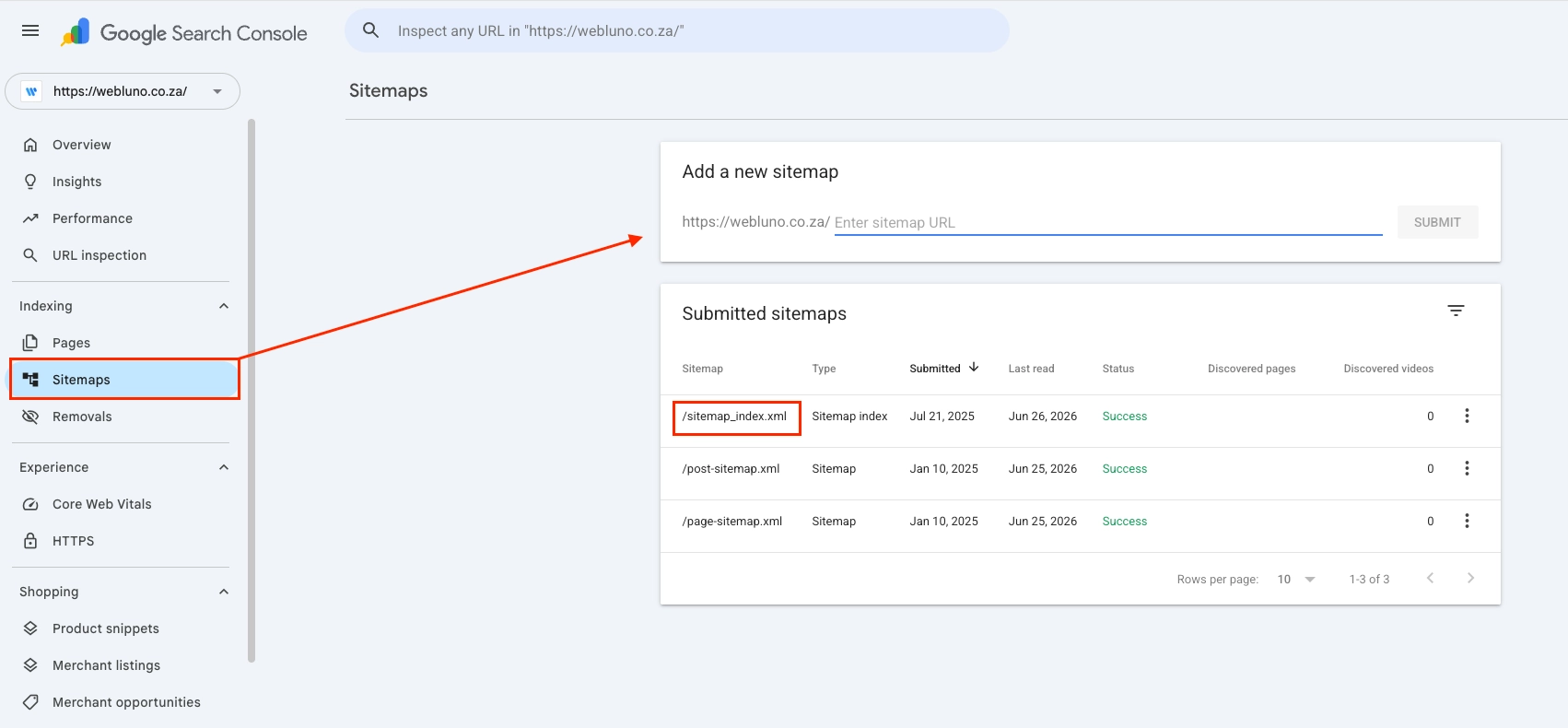
Submitting a sitemap through Google Search Console is straightforward. Once your sitemap is ready, the process only takes a few minutes.
Here are the basic steps:
- Log in to Google Search Console using your Google account
- Select the correct website property from your dashboard
- On the left-hand menu, click on “Sitemaps”
- In the “Add a new sitemap” section, enter your sitemap URL (for example: sitemap.xml)
- Click submit
- Wait for Google to process the file and confirm successful submission
After submission, Google will begin reading the sitemap and using it to crawl your website more effectively. You can return to this section at any time to check for errors, warnings, or successful indexing updates.
It is also worth noting that you only need to submit your sitemap once. However, if your website structure changes significantly, updating and resubmitting it can help keep everything accurate.
How Do I Get A Sitemap?
Most modern websites already have a sitemap automatically generated. If you are using WordPress, there is a strong chance your site already includes one without any extra setup.
A common way to check is by visiting:
yourwebsite.co.za/sitemap.xmlIf a sitemap exists, it will usually open a structured page showing your website’s URLs.
For WordPress users, SEO plugins make this process even easier. Popular tools such as Rank Math and Yoast SEO automatically generate and update your sitemap whenever you publish new content. These plugins follow a standard sitemap structure, meaning the URL will typically remain:
yourwebsite.co.za/sitemap.xmlIf your site does not have a sitemap, you can create one using:
- An SEO plugin (recommended for WordPress users)
- A website builder that includes built-in SEO tools
- Online sitemap generators for custom-coded websites
Once created, it is important to ensure the sitemap stays updated. This helps search engines stay in sync with your latest content without needing manual adjustments.
Why Should We Submit Our Sitemaps on Google?
Submitting a sitemap is not just a technical step, it directly affects how well your website is understood by search engines. While Google can discover pages on its own, a sitemap speeds up the process and reduces the chances of missing important content.
One of the main benefits is improved indexing. When Google receives a sitemap, it can quickly identify all key pages and prioritise crawling them. This is especially helpful for new websites that do not yet have many backlinks pointing to their pages.
Another benefit is better control over your website’s visibility. A sitemap helps Google understand which pages are most important, how often they are updated, and how they relate to each other. This can contribute to more accurate search listings.
Sitemaps are also useful for larger websites with complex structures. Without one, some deeper pages might not be discovered easily. This can limit your visibility in search results.
From an SEO perspective, submitting a sitemap supports:
- Faster indexing of new content
- Improved discovery of deep pages
- Better understanding of site structure
- More efficient crawling by search engines
It also provides transparency through Google Search Console. You can see how many pages have been indexed, identify errors, and monitor improvements over time.
While it does not guarantee higher rankings, it does give your website a stronger foundation for search performance. Combined with good content and technical SEO, it becomes part of a reliable long-term strategy.
Warning When Using a Caching Plugin
If your website uses a caching plugin, it is important to ensure your sitemap is excluded from caching. This helps Google always access the most up to date version of your sitemap whenever it crawls your site.
Although cache does have a lifespan and will eventually refresh on its own, it is still best to exclude your sitemap manually to avoid any delays in updates being seen by search engines. Most caching plugins already exclude sitemaps by default, but it is worth double checking your settings and adding the sitemap URL as an exclusion to be safe.
Website Sitemap Conclusion
Understanding how to submit a sitemap is one of the simplest yet most effective steps in improving a website’s SEO performance. It ensures that search engines can access your content efficiently and keeps your site properly indexed as it grows.
For most website owners, the process involves generating a sitemap, checking that it is accessible, and then submitting it through Google Search Console. Once completed, it requires very little maintenance, especially if your site uses an SEO plugin that updates it automatically.
If you are still struggling with the setup or are unsure whether your sitemap is working correctly, professional support can help. Webluno offers assistance with this process through affordable SEO packages and website maintenance services designed specifically to handle tasks like sitemap setup, submission, and ongoing optimisation.
Taking care of your sitemap is a small step, but it plays an important role in making sure your website is properly seen and understood by search engines over time.


