
Find out exactly what Two-Factor Authentication is, how it works, and why it plays such a very important role in protecting your WordPress website from hackers and brute force attacks.
Website security has become one of those things that gets ignored until it’s too late. Most site owners set up a password when they first build their WordPress site, tick the box, and move on with their lives. The trouble is, a single password is no longer enough to keep the wrong people out.
According to Colorlib’s WordPress security research, 11,334 vulnerabilities were discovered across the WordPress ecosystem in 2025 alone, with the vast majority linked to outdated plugins rather than the WordPress core itself. That’s not a small number, and it shows just how often opportunistic hackers are probing sites for a way in.
The login page is usually the first target. It’s the front door to your website, and if that door only has one lock, it’s only a matter of time before someone finds a way to pick it. This is exactly where WordPress two-factor authentication comes in, adding a second lock that makes a stolen or guessed password far less useful to an attacker.
What Is Two-Factor Authentication (2FA)?
Two-factor authentication, often shortened to 2FA, is a login process that requires two separate pieces of proof before granting access to an account. It’s worth understanding the difference between authentication and authorisation here, as the two get mixed up quite often.
Authentication is about proving who you are, while authorisation is about what you’re allowed to do once you’ve proven it. 2FA sits firmly in the authentication camp; it simply makes sure the person logging in is actually who they claim to be.
The system works by combining two different types of security factors. The first is something you know, which is usually your password. The second is something you have, such as your mobile phone or a physical security key. On their own, either of these can be compromised.
Passwords get leaked in data breaches, and phones can occasionally be lost. Together, though, they create a barrier that’s genuinely difficult to break through, because an attacker would need both your password and physical access to your device at the same time.
This is why WordPress login security improves so dramatically the moment 2FA is switched on.
How Does Two-Factor Authentication Work?
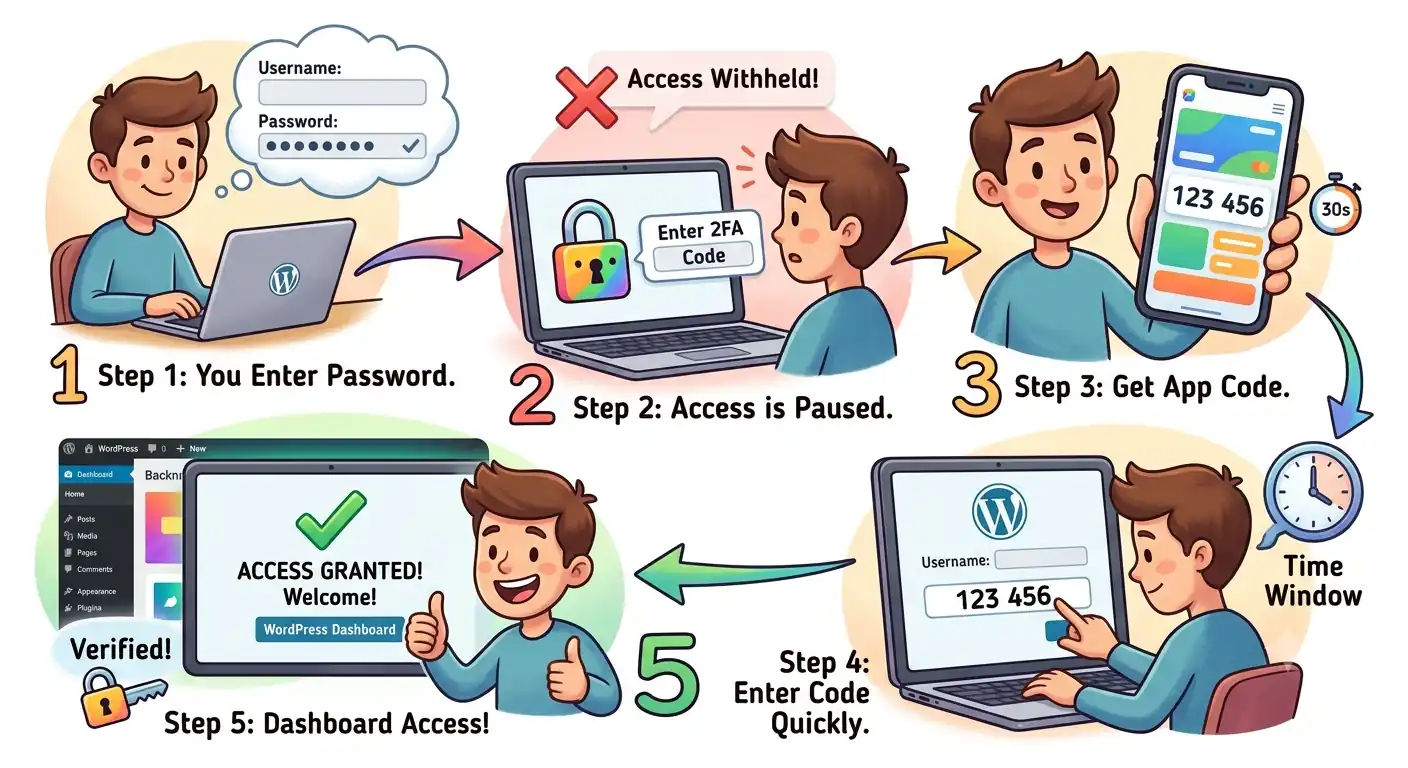
In practice, 2FA works by generating a unique, temporary code that only your device can produce. Popular authenticator apps such as Google Authenticator, Microsoft Authenticator, and Authy are widely used for this purpose.
Here’s a simple step by step guide to how 2FA works:
- You enter your username and password as usual on the WordPress login screen.
- The site recognises the password is correct but withholds access, asking for a second code.
- You open your authenticator app, which displays a six digit code tied to your account.
- You type that code into the login screen within the given time window.
- Once verified, you’re granted access to your WordPress dashboard.
These codes aren’t static. They’re generated using a shared secret between your app and your website, and they refresh every thirty seconds or so, meaning a code seen once is useless shortly after. Some setups also allow authentication through phone calls, emails, or SMS messages instead of an app, though these methods tend to be slightly less secure, as we’ll cover further down.
Why A Password Is No Longer Good Enough
Passwords have a fundamental weakness: they can be guessed. Many people still build their passwords around personal details such as their name, a birthday, a pet’s name, or their business name, all of which can be found with a bit of digging or educated guesswork. Automated tools make this worse still, cycling through thousands of combinations a minute in what’s known as a brute force attack.
Authentication codes work differently. Because they’re only valid for a matter of seconds before they expire, there’s simply no realistic window for a hacker to guess or brute force their way through one, even with automated software. A password sits still, waiting to be cracked. A 2FA code moves on before anyone gets the chance.
How Does Two-Factor Authentication Protect WordPress Websites?
Every WordPress site, whether it’s a small blog or a business website, relies on the same basic login process.
Admin and non-admin users alike log in using a username or email address paired with a password. Once that password is entered and successfully verified, the user is granted access to the most sensitive part of the site, the dashboard where content, plugins, users, and settings all live.
This is precisely the point where 2FA changes things. Even if a hacker has correctly guessed or stolen a password through a phishing attempt or a leaked database, they still can’t get past the login screen without the second factor. This single extra step is often enough to stop an attack in its tracks, because most attackers move on to easier targets rather than trying to also compromise a physical device.
Does Two-Factor Authentication Make Passwords Obsolete?
Two-factor authentication does not make passwords obsolete or bulletproof; your password remains the essential first layer of account security. Standard 2FA relies entirely on a password to function, meaning a weak, reused, or compromised password still leaves your account vulnerable.
2FA simply adds a secondary barrier alongside your password, it does not replace the need for strong, unique passwords. Think of it as reinforcing the door rather than removing the lock altogether.
Types of Two-Factor Authentication Compared
There are several ways to receive your second authentication factor, and they’re not all equally secure.
Phone calls and SMS messages are convenient, as most people always have their phone nearby, but they rely on the mobile network and can occasionally be intercepted through SIM swapping.
Email codes are the most familiar method for many users, but they’re also the weakest link, since a compromised email account would give an attacker access to both the reset process and the authentication code at the same time.
Authenticator apps, on the other hand, generate codes directly on your device without needing an internet or mobile connection, making them far harder to intercept.
| Method | Security Level | Ease Of Use |
|---|---|---|
| Authenticator App | Most secure | Easy once set up |
| SMS | Moderately secure | Very easy |
| Phone Call | Moderately secure | Easy |
| Least secure | Easiest |
As the table shows, convenience and security don’t always line up. Email might be the simplest option to set up, but it’s also the one we’d recommend avoiding if your website holds anything sensitive.
How To Enable Two-Factor Authentication On WordPress
There are numerous plugins available for adding 2FA to a WordPress site, and it can be a bit overwhelming trying to work out which one to trust. Our recommendation is Wordfence, which has 2FA built in and works with any standard authenticator app.
Rather than installing a separate plugin just for two-factor authentication, Wordfence bundles it together with a wide range of other security features, including a firewall, malware scanning, and login attempt monitoring, all in one place.
This keeps your plugin list lean while still covering the essentials of protecting your WordPress login.
Conclusion
Two-factor authentication isn’t a silver bullet, but it’s one of the simplest and most effective steps any WordPress site owner can take to protect their login page from brute force attacks and unauthorised access.
Combined with strong, unique passwords and a few other good WordPress security tips, it forms a solid foundation for keeping your website, your data, and your visitors safe.
If setting this up yourself feels like one more thing on an already long to-do list, Webluno can help. Our website maintenance services include two-factor authentication setup and ongoing security management, so you can focus on running your business while we keep the login page locked down.
Frequently Asked Questions
Does 2FA slow down the login process significantly?
Not really. Once set up, entering a code takes a few seconds and quickly becomes part of your normal login routine.
Can I use 2FA if I manage multiple WordPress websites?
Yes, most authenticator apps let you store codes for several websites in one place, so you don’t need a different app for each site.
What happens if I lose my phone with the authenticator app on it?
Most plugins provide backup codes generated during setup, which you should store somewhere safe in case your device is lost or replaced.
Is 2FA only necessary for admin accounts?
No, any user account with access to sensitive areas of your site benefits from the extra layer of protection, not just admins.
Will 2FA protect my website from all types of hacking attempts?
No single measure covers everything. 2FA significantly reduces the risk of unauthorised logins but should be paired with regular updates and other security practices.


